Publications

Videos

Making videos at Sussex: what you need to know

If you are considering producing video footage, you should always use a professional video production company or freelance supplier. Contact our corporate editor, Sara Adamson, for details of suppliers.

Videography is highly skilled (and time consuming) and to ensure that we maintain the high quality that is part of our brand we strongly recommend that you do not shoot and edit videos yourself.

Your video will need to strictly adhere to the University’s brand requirements, and it must be of good technical quality, with interesting content that’s relevant to your audience.

The golden rule with video is to keep things concise and tightly edited and to target your video to your specific audience. Viewers will not sit through more than a few minutes of video, so identify your audience and the key messages you want to get across and stick to them.

We want all our films to have a consistent look and feel, which will help strengthen the Sussex brand. See brand essentials for video section below for more on this.

Things to consider when producing a video

Planning is the most important stage in creating a successful video.

Speak to your marketing manager or head of unit before you begin any work on your video, to ensure that your video fits within the agreed communications and marketing plan for your school/unit. You should not proceed until you have their approval.

Audience

  • Who is your target audience, and what do you want them to do? How will you make your film relevant and interesting to them?
  • What is your key message?
  • How will you promote the video to your audience?

Admin

  • What is your budget?
  • Who will ultimately sign off and be responsible for the video?
  • What locations will you use for filming? Do you have permission?

Technical

  • What type of video do you want to make? (eg talking head, documentary etc – see below for examples)
  • Who will be in the film?
  • Where are you going to shoot?
  • Is your supplier is aware of the technical specs we generally use for video?

Tips for shooting videos

Keep your film as short as possible – online, people tend to lose interest after 2-3 minutes. If you have a lot to say, consider making a number of shorter, more focused, films, rather than a 20-minute epic.

Interview tips

  • Use people who are comfortable in front of the camera
  • Keep their answers short and to the point
  • If an answer isn't clear or is too long, do another take
  • Make sure they are using the correct terminology
  • Read our photography guidelines to make sure clothing etc is appropriate
  • If shooting in a lab or similar, the appropriate safety equipment should be used (eg gloves, glasses etc)
  • The interviewee should not talk directly to camera, which looks odd, but should direct their answers to the interviewer (sitting just to one side of the camera)
  • Go through a prepared list of questions with your interviewee beforehand, and make sure they are aware of the key message you are trying to communicate
  • If you don’t want your questions included in the audio, replies will have to be phrased so it’s obvious what the question was
  • If your presenter or interviewee is going to be using a PowerPoint presentation, this should be on one of the Sussex-branded templates

Shooting tips

  • Make sure your shooting location looks good on camera, and is very quiet. It should have plenty of light, unless you are using extra lights – consult your supplier
  • Make sure you’re happy with the background of a shot – look through the camera to check the framing
  • You will need plenty of ‘cutaway’ shots to help you edit your film – allow enough time to shoot these
  • Schedule enough time for shooting – set up etc takes longer than you would think. You should make a schedule and make sure your supplier sees/approves it in advance
  • If you are shooting in more than one location, bear in mind you will have to move a lot of equipment – so the closer your locations are to each other, the better
  • If you are shooting outside, it will be difficult to get good-quality audio – your supplier can advise.

Examples of video types

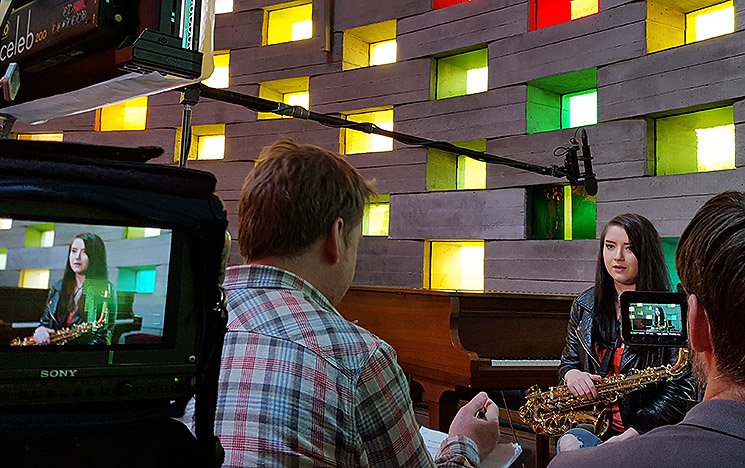
There is a selection of videos previously made by the Publications and Branding Team, available to view on YouTube. The majority of our videos are ‘talking heads’. These are short interviews where the interviewee speaks directly to the camera or looks at the interviewer when speaking, and can be recorded quite quickly and easily. They work well for promoting degrees and facilities and really enhance web pages.

We have also filmed debates and lectures, and made documentary-style videos about our research and other aspects of university life

Other considerations

Consent forms

All clearly identifiable individuals in any video footage must sign a consent form before the video is used anywhere. Generic filler shots (eg groups of people walking across campus), do not require permission from everyone in shot.

Music and images

If you want to use music, photos or pre-existing video footage in your video you will need to check if they have copyright associated with them. Unless you have specially commissioned a piece of music you should assume that any other music you find (eg from commercial CDs or from the web) is copyrighted. This type of music can only be used if a special music licence has been obtained.

Unless you have specific permission that confirms your particular use, assume you cannot use it. If you want to use photographic stills in your video (eg as a backdrop) you will also need to ensure you have explicit, written permission to do so. Refer to Copyright for more information.

Editing

Brief your supplier to keep your video simple and short. If you try to be too complicated at edit stage, you may never get it finished in time for it to be used. Always think about editing while you’re recording your footage. We discourage the use of ‘wipes’, ‘dissolves’ or other flashy cuts between shots, as these can quickly look dated.

Cutaways

Think how your series of shots will be to be put together. It might be helpful to storyboard the film as part of the planning process. Don’t shoot too much footage, but make sure you have enough to cover what you intend to achieve. You will probably need to shoot cutaways – these are filler shots, which help add pace and cover any interview hesitations or repetitions that need to be cut out.

Getting your film online

There is an official Sussex YouTube channel, where we put most of our online video content. It can then be embedded into our website from YouTube. YouTube lets you track views, and your viewers can comment on your film and find other similar films about Sussex.

If you would like your film uploaded to the channel, please send your finished film to the Corporate Editor in the Publications and Branding team, along with its title, a short intro paragraph, and any tags you would like included. Once the film is on YouTube, you will be able to embed it to your webpage via the WCM. You should also consider cross-posting it on any other social media you are using (eg Twitter, Facebook), and even on third-party websites.

If your film is not on brand, is factually incorrect, or we think it’s not good enough quality, we will not post it on the Sussex YouTube channel and you will not be able to embed it on your webpages. We encourage you to send a rough cut to the Corporate Editor for checking before you sign it off, so any potential problems can be addressed at an early stage.

If you are planning on making a large number of films on an ongoing basis, you should consider setting up a dedicated YouTube channel – please consult the Corporate Editor before doing this.

Showing your film at an event

If you are showing your film at an event, make sure you know what format will work best for the AV set up at the venue. If possible, find out before you start shooting, in case there’s a specific aspect ratio you need to fit into. The venue will be able to advise you. 

Brand essentials for video

Logo

You should use the standard ‘US’ Sussex logo, or if the film is specific to your School or unit, you can use that logo instead. The logo should always be left aligned –  never centred – ideally in the bottom left corner. It can be in black, white or flint – whichever works best on your background. You can get the relevant logo from the Publications and Branding Team (publications@sussex.ac.uk). Please note that you should never create your own logo for your school or unit. Only approved logos obtained from the Publications and Branding Team may be used.

Fonts

You should only use our corporate fonts: Franklin Gothic Book or UoS Baskerville. If you don’t have these fonts already, your videographer can get them from the Publications and Branding Team (publications@sussex.ac.uk). We have found that Franklin Gothic Book is more legible on screen for longer captions. 

Text

All text should be left aligned, never centred. Never use all capital letters in headings/titles, use sentence case. The second word and subsequent words in headings are always lower case, unless a word is a proper noun, eg The School of Life Sciences offers programmes in biology, ecology and conservation. Avoid using initial caps for common nouns, eg universe, chocolate. For more details, refer to the Writing and Style Guide.

Special effects on text

Avoid flashy special effects on text (eg drop shadows, animations, etc). Just keep text simple and legible.

Intros and outros

Start your film with a simple ident: the title of the film, and the Sussex logo placed in the bottom left corner. Refer to the video University of Sussex: fees and funding for entry in 2012 for an example of good practice. Or see the example of an intro below.

Intro example


If you can, include a URL at the end of your video as a call to action, again with the logo in the bottom left corner. The URL should be in bold text.

Please read our webpages at www.sussex.ac.uk/publications/visualidentity for a full explanation of our visual identity.

Technical specs for suppliers

Screen ratio 16:9

Resolution min 640X360

File size approx. 200MB (for online use)

Include an intro and outro that are consistent with our branding guidelines