

Endpoint Protection
How to check endpoint protection is installed on a University provided device.
The instructions below apply to staff who are using Sussex provided devices only. This does not apply to those using University of Brighton laptops and PCs (i.e. many BSMS colleagues), or those using their own devices.
The University has virus/endpoint protection software called Sentinel One. Sentinel One runs in the background of your computer and ensures that your computer is protected, and University information is kept safe.
How to check if you have Sentinel installed
Check that your computer has Sentinel installed by following the simple steps below.
Windows
If you are working on a windows operating system (this is the majority of laptops and desktop PCs)
- type ‘Sentinel One’ in the white search box at the bottom of the left-hand side of your screen
- if Sentinel One is installed, the Sentinel One icon will be in the Windows search box and no further action is required.
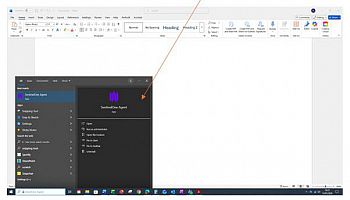
Or, you can check as follows:
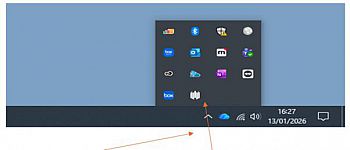
- on the bottom right hand of your screen, press the arrow head pointing up to reveal hidden icons
- the white/grey 5 lined icon means that Sentinel One is deployed and no further action is necessary.
Mac
If you are working on a Mac operating system:
- type ‘Sentinel One’ in the search box at the top of the right-hand side of your screen
- if Sentinel One is installed, the white/grey ‘S’ Sentinel One icon is present and no further action is required.

Linux
If you are using a Linux operating system:
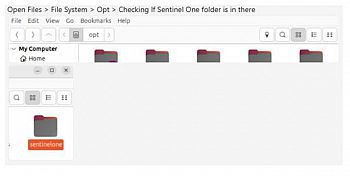
- check in files
- if Sentinel One is installed, there will be a file named ‘Sentinel One’ and no further action is required.
Action required
If you do not have Sentinel One installed please contact the IT Service Desk as soon as possible.
Provide your asset number (which can be found on the barcode sticker on your device) and the operating system you are using. IT can then work with you to make sure the device has the protection needed.
Sentinel One has been installed on thousands of PCs across the University without issue. The installation process should take approximately 15 minutes.