RESOLVED: We are currently investigating an issue affecting Turnitin assignments.
Click here to show/hide earlier details
Posted: Mon 19 Jan 2026, 1:41pm.
Current issue
When accessing student submissions via Grades on a Canvas module, Canvas takes you to the Speedgrader marking interface, not Turnitin.
Some student submissions have been marked in Canvas Speedgrader, not Turnitin Feedback Studio. Students will not be able to see this feedback.
Action required (anyone who is marking student submissions)
Until the issue is resolved, if you need to mark a Turnitin assignment in Canvas, use the Assignments screen in Canvas to access the student submissions and mark the assignment. Using the Assignment screen will take you to Turnitin Feedback Studio for marking. Do not use Grades.
If you have already marked a Turnitin assignment, check any scripts you have already marked and download any comments that have been recorded in Canvas Speedgrader. The instructions below show how to do this, we have also put together this short video:
- In the Canvas module, go to the Grades screen.
- For each submission with a mark, open the submission as if you were going to mark it (in Gradebook click on the mark, then click on the arrow to open the submission, and click Mark assignment).
- Check if there are feedback comments in Speedgrader (see screenshot below).
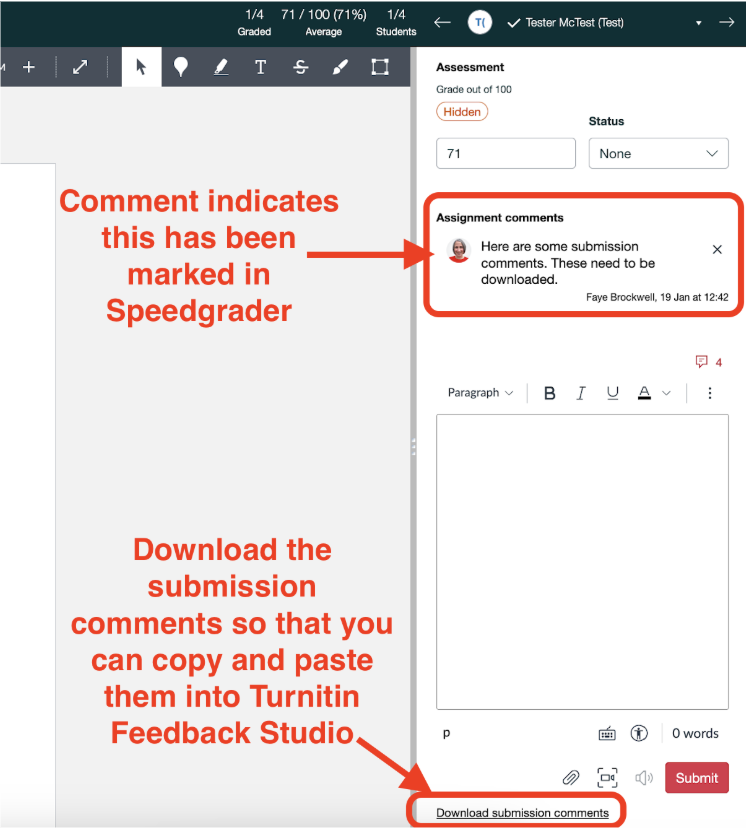
- If there are feedback comments in Speedgrader, click the Download Submission Comments link at the bottom of the right-hand Speedgrader pane.
- You will need to re-add these comments to the student submission in the Turnitin Feedback Studio marking interface. To do this, access the student submission via the module’s Assignments screen.
- Markers should check that all feedback comments are in Turnitin before releasing any marks and feedback to students.
Please contact ee@sussex.ac.uk if you have any questions.
UPDATE: 19 Jan 2026 - 4:44pm
The issue has now been resolved and you will be taken to the Turnitin marking interface for Turnitin assignments and marking can resume as normal.
If you have left any feedback within the SpeedGrader interface for a Turnitin assignment then this feedback will no longer be visible to staff or students, EE are working to identify affected assignments and make the feedback available.
Please contact if you have any queries or questions
Thank you
